I Built a Voice Health Logger and Deployed It From My Couch
I had a text-based meal logger that worked perfectly. Nobody used it. The moment I added a mic button and put it on my phone, it became real.
The meal logger already worked. That was the problem.
I had /log-meal and /log-workout running as slash commands inside my AI OS, the personal operating system I built with Claude Code. Natural language in, structured data out. It parsed "two cups of white rice with Jamaican curry chicken" and knew that meant bone-in thigh, no coconut milk (just coconut oil), scotch bonnet, allspice. It handled portion multipliers, matched against a saved meal library, and wrote clean rows into Postgres. The macro estimates were solid.
Nobody was using it. By "nobody" I mean me. The problem was friction: it required sitting at the computer, opening a terminal, typing a slash command. That is not how you eat. You eat at the kitchen table, on the couch, standing over the stove. The AI OS had the intelligence. It just didn't have the interface for the moment it mattered.
So I built a voice interface, deployed it to my server, and installed it as a PWA on my phone in a single session. Here is how that went.
The Gap Was Always the Interface
The idea surfaced mid-conversation. I was already using a voice notes app for other things, and I asked: why don't we have a voice food logger? The parsing logic was proven. The database was live. The only missing piece was a mobile-first interface that would let me speak, confirm, and move on.
My first instinct was to route it through my Telegram AI agent. It already handles meal queries and morning briefings, so adding voice intake seemed natural. But I paused on that. It requires a specific setup: the bot, the agent infrastructure, the webhook chain. A standalone app would be portable. Someone else could spin it up with three environment variables and a schema file.
That constraint turned out to be a useful one. It forced me to build something clean instead of bolting onto existing infrastructure.
What I Built
The architecture is simple by design.
Frontend: A single HTML file. Mobile-first layout, vanilla JavaScript, MediaRecorder API for in-browser audio capture. No build step, no framework, no node_modules. The browser records a WebM audio clip, sends it to the backend as a multipart form upload, and waits for a parsed response.
Backend: One Python file, around 500 lines. Flask handles the routes. When audio arrives, it gets forwarded to OpenAI's Whisper API for transcription. The transcript goes to Claude Haiku with a structured prompt that extracts meal or workout data. Haiku returns JSON with calories, macros, and a type classification. The backend writes to Postgres and returns a confirmation card to the frontend.
Database: The same Postgres instance that everything else uses. The meals, workouts, exercises, and saved meals tables were already there. Adding the voice logger required zero schema changes. It just needed a connection string.
The flow from the user's perspective: tap record, speak, tap again to stop, see the parsed estimate, confirm or discard. That is the whole thing.
The Cultural Food Problem
Generic meal parsers fail on real food. If you tell a standard nutrition API "curry chicken," it will return a calories estimate for some Western interpretation of curry. It will not know that Jamaican curry chicken uses bone-in thigh, coconut oil instead of coconut milk, scotch bonnet, allspice, and potatoes.
The prompt I built for Haiku carries explicit cultural context. It knows the difference between preparations. It applies portion multipliers. It checks against the saved meal library before estimating from scratch. The same logic that powered the terminal commands now runs behind the voice interface, so saying "bowl of curry chicken" from my phone produces the same result as typing /log-meal bowl of curry chicken at my desk.
This matters more than it sounds. A logger that fails on the food you actually eat stops being useful within a week. Cultural accuracy is not a nice-to-have.
The Redesign Pass
The first version worked and looked like a developer made it. Dark background, plain buttons, functional. I sent a reference screenshot of a glassmorphism voice app and said something like: "something like this, but in my brand colors."
The redesign happened in one pass:
- An animated gradient orb that morphs and floats behind the record button, shifting between purple and blue, pulsing when recording is active
- Frosted glass cards using
backdrop-filter: blur()for the result panels - Ambient background glow that responds to app state
- Inter font throughout
- Gradient accents on action buttons
The state transitions are handled by CSS class toggles. Idle state, recording state, processing state, result state. Each has distinct visual feedback so you always know where you are without reading any text. That matters on a phone when your hands might be full or greasy.
Deployment: The Parts That Did Not Go Smoothly
Getting it onto the server was mostly straightforward, except for the parts that were not.
The server already runs a reverse proxy that auto-provisions SSL certificates. Adding a new subdomain is a three-line config change and a reload. Point a DNS record, wait a few minutes, and HTTPS works.
The Docker container was straightforward too. But deployment is never just the happy path. Static file routing broke when I moved the project directory. The PWA refused to install because the icon files were not reachable at the expected paths. Environment variables were silently empty inside the container. Old processes were fighting over the same port.
None of these took long to fix. They never do individually. But they stack up, and each one feels like a config problem until you find the actual cause. Deployment is mostly known unknowns: the same five categories of problem, in different clothing each time.
Installing It as a PWA
Once it was live, I opened the URL on my phone. Chrome prompted me to add it to the home screen. I tapped it, named it, and within thirty seconds it was installed as a standalone app: full screen, no browser chrome, its own icon, its own launch experience.
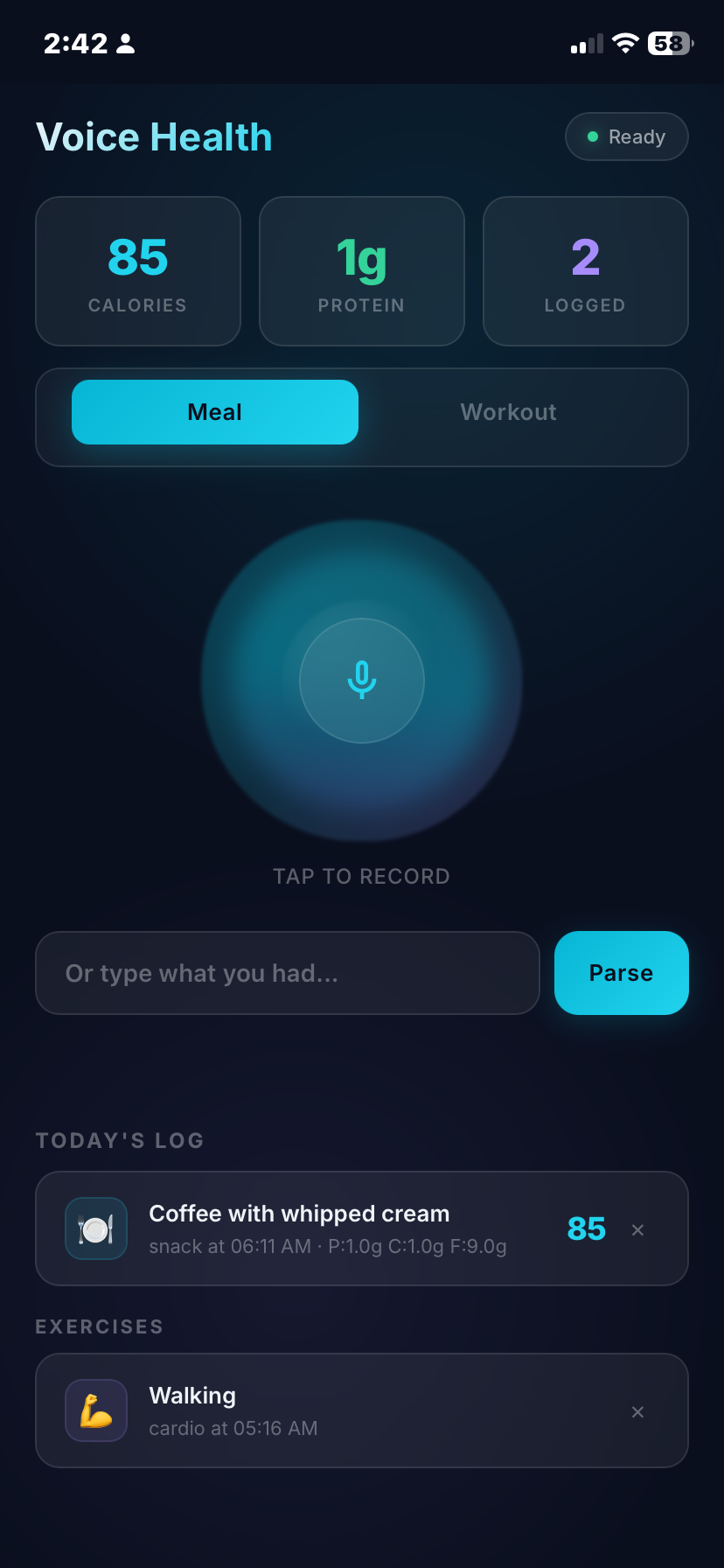
That moment changes the relationship to the tool. A URL feels optional. An icon on your home screen, next to the camera and the messages app, feels like infrastructure. The friction drops below the threshold where you stop reaching for it.
The first meal I logged with it was the curry chicken I was cooking while the deployment was still running. That felt right.
The Stack at a Glance
- Frontend: Single HTML file, CSS glassmorphism, MediaRecorder API, vanilla JS
- Backend: Flask, psycopg2, requests, one file around 500 lines
- Transcription: OpenAI Whisper API, roughly $0.006 per minute of audio
- Parsing: Claude Haiku, roughly $0.01 per parse, with cultural food detection and workout set notation
- Database: PostgreSQL, same instance as the rest of the system
- Deployment: Docker on a VPS, reverse proxy with automatic SSL
- PWA: manifest, service worker, home screen installable
To adapt it for someone else: swap three environment variables, run a schema file against a Postgres database, and deploy. The cultural food context in the prompt is the only part that is personal, and it is just text.
The Real Lesson
I had the right tool for months. I was not using it because the interface did not fit where I actually was when I needed it.
This is not a new insight. Interface friction kills adoption, and that applies whether the user base is one person or a million. What surprised me is how small the gap was between "works at the computer" and "works in the kitchen." A single HTML file, one Python file, a Docker container, and a proxy config entry. A few hours of work. The gap between a tool that sits unused and a tool that becomes part of your day is often not the logic. It is the last hundred meters of UX.
Voice as an interface has a specific quality that text does not: it matches the cognitive state you are in when you need it. When you are cooking, your hands are occupied and your attention is split. Typing a slash command requires sitting down and switching modes. Tapping a microphone and saying "large bowl of rice and curry chicken" does not. The information flows out naturally, in the same moment it would have been lost.
I have been thinking more carefully about this distinction since finishing the project. The terminal commands were for me-at-the-computer. The voice app is for me-in-my-life. Both talk to the same database. Only one of them actually gets used.
The next thing I build, I am asking that question first.